By clicking “Accept All Cookies”, you agree to the storing of cookies on your device to enhance site navigation, analyze site usage, and assist in our marketing efforts. View our Privacy Policy for more information.
Cart
Product Name
Option 1 / Option 2 / Option 3
Weekly Delivery
Product Discount (-$0)
COUPON1 (-$0)
$0
$0
-
Thank you! Your submission has been received!
Oops! Something went wrong while submitting the form.
+
Cart is empty
Success message won't be visible to user.
Error message won't be visible to user.
Success message won't be visible to user. Coupon title will be listed below if it's valid.
Invalid code
Coupon1
Coupon2
Subtotal
$0
Order Discount
-$0
COUPON2
-$0
Total
$0
Please agree to the terms and conditions before making purchase.
Thank you! Your submission has been received!
Oops! Something went wrong while submitting the form.
DINGZ SUPPORT CHAT

Questions about dingz? Ask our chatbot.

CONTACT & SUPPORT

Get in touch

Have questions about dingz products, installation, configuration, or an existing project? Send us your request. Our team will respond personally and connect you with the right specialist when needed.

Product and installation support
Configuration and user guidance
A personal response from the dingz team
Adriano
CUSTOMER INQUIRIES & SUPPORT

Your personal point of contact for questions, support, and everything related to dingz products.

Thank you for your message!
We’ve received your request and will get back to you as soon as possible.
Oops! Something went wrong while submitting the form.
Address

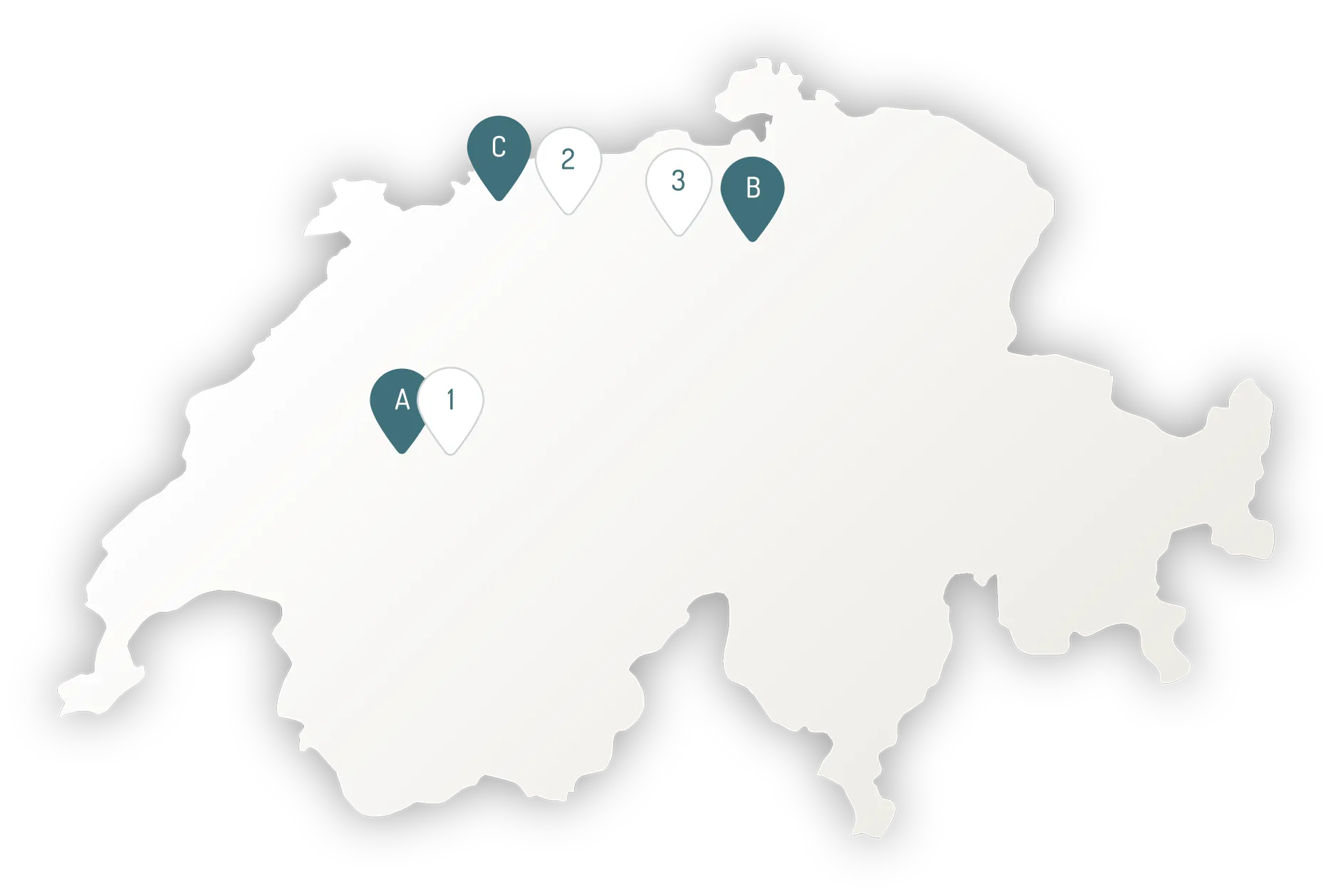
Our Locations

A
dingz Headquarters
Pra Pury 7d, 3280 Murten FR
B
dingz Sales Office
Schützengasse 11, 8001 Zurich
C
dingz Sales Office
Kapellenstrasse 34, 4052 Basel
Showrooms
1
dingz Headquarters
Pra Pury 7d, 3280 Murten FR
2
Firalux Design AG
Hauptstrasse 21, 4461 Böckten BL
3
TKL Licht GmbH
Alte Bruggerstrasse 32, 5506 Mägenwil AG
Map outline of Switzerland with six markers labeled A, B, C and 1, 2, 3 placed mainly in the northern and western regions of the country.
FAQ

Frequently asked questions

We’ve answered the most common questions about installing, using, and recommending dingz for your projects within this FAQ.

Still have questions? Contact our support team, try out our Artificial Intelligence, Camille and Lisa, or browse our documentation!

Is there any detailed installation guide?

A detailed manual for the installation can be found here.

Does dingz have any API?

Yes, dingz can be accessed via a REST API, documentation on https://api.dingz.ch

What to do if dingz does not work?

If your dingz switch does not work, the following measures are possible:

1) Turn your dingz switch OFF and ON again

2) Perform a factory reset (the connection to the WiFi is lost and your dingz switch has to be reconfigured)

How can I load the dingz standard configuration?

Press and hold both diagonal buttons 1 and 4 simultaneously for 10 seconds. The LED flashes 5x alternately white/red – this resets the settings of the dingz switch to the standard configuration. The connection to the WiFi is not lost.

How can I program Philips Hue and Sonos?

Sonos & Phillips Hue must be set up first. Select “Sonos & Hue” in the top left menu and search for Sonos devices or authorize the Phillips Hue Bridge for dingz. You need to be on the same Wi-Fi network.

Is it possible to downgrade the dingz FW?

No, an update of the dingz FW cannot be undone for security reasons.

How can I update the FW of dingz?

If a new FW version is available for dingz, it will be displayed in the dingz app. You can then choose yourself on which dingz the new FW version should be installed.